NEW Away Brief and Insights are in every plan

Step away from your PC. Stay active in Chrome.

Windows Mouse Mover keeps the web apps in your browser seeing you as active and holds the screen awake while a long download, render or call carries on without you.

1-hour free trialNo card neededChrome, Edge and Chromebooks
Keeps you active in the web apps that watch for idle time
SSlack TMicrosoft Teams MGoogle Meet GGmail DDiscord ZZoom CClickUp
How it works

Three notifications, then you're set.

Nothing to configure. It lives in your Chrome toolbar and runs for as long as the browser is open.

Windows Mouse MoverStep 1
01

Add it to Chrome

Install it from the Chrome Web Store, then pin it to your toolbar so it's one click away.

Windows Mouse MoverStep 2
02

Start your free trial

Create an account and get a free hour, no card needed. Already subscribed? Paste your activation key.

Windows Mouse MoverStep 3
03

Press Start and step away

It keeps going until you pause it or close the browser. When you come back, your Away Brief is waiting.

StartPause
Built in

It keeps you active. Then it catches you up.

Two extras run entirely inside your browser, included in every plan and the free trial.

Away Brief

Come back to a short list, not a pile.

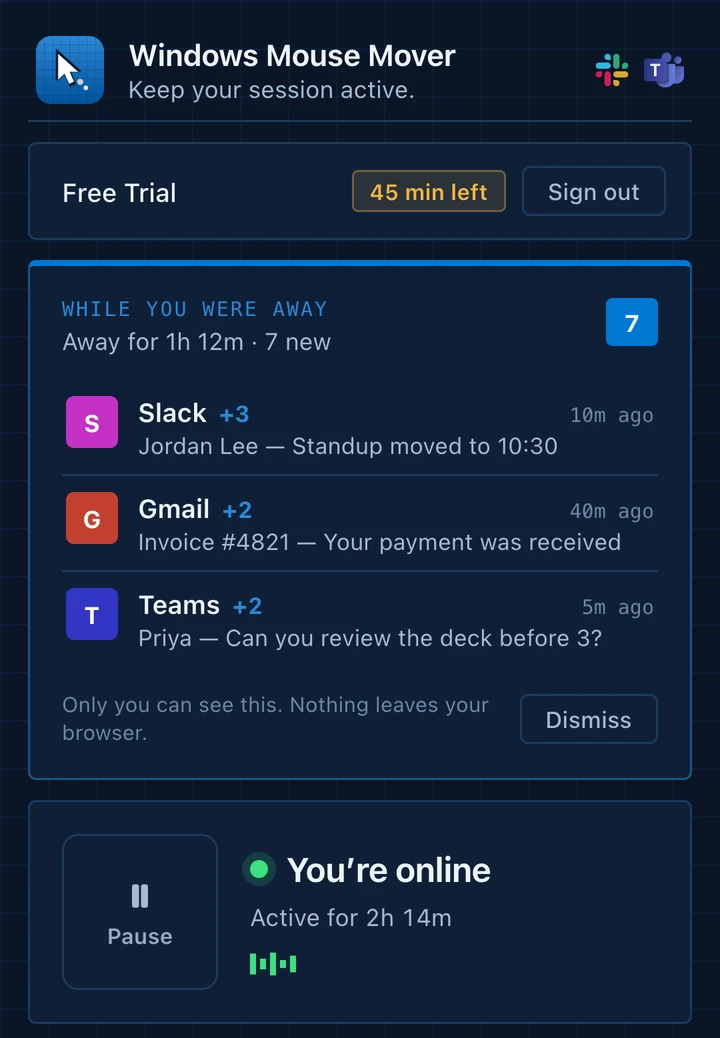
While it runs, the extension notes the notifications your open web apps raise. When you're back at the keyboard, they're waiting for you, grouped by app, newest first.

  • Shows up on its own when you return
  • Covers Slack, Gmail, Teams and other apps open in your tabs
  • Stays in your browser. Nothing is uploaded
Notifications Clear all
Windows Mouse Movernow
While you were away 7

Away for 1h 12m. Here's what came in.

SSlack · 3 new10m ago
Jordan Lee

Standup moved to 10:30

GGmail · 2 new40m ago
Invoice #4821

Your payment was received

TTeams · 2 new5m ago
Priya

Can you review the deck before 3?

Insights

See the hours it has covered.

Insights adds up every minute the extension has kept your session active: an all-time total, the last seven days, and how much of it you were actually away.

  • Running total since you started
  • Seven-day graph with today highlighted
  • Sessions, away time and your current streak
Insights Last 7 days
Active time58.6 h
Away covered14h 12m
Sessions41
Active timeSince Sep 6
Total58.6 h
Away covered14h 12m
Streak7 days
Under the hood

One job, done inside the browser.

Here's exactly what it switches on while it runs, and what it leaves alone.

Windows Mouse MoverChrome extension
ActivityAway BriefInsightsPrivacyAccount

Activity

On while it runs
Simulate activity in your tabsSmall mouse, scroll and key events on a timer, so web apps keep seeing you as present.
On
Keep the screen awakeAsks Chrome for a wake lock so the display doesn't dim mid-task.
On
Vary the timingMovement and intervals change a little each cycle.
On
Never touched
Other apps and Windows settingsDesktop apps, power options and IT-enforced locks stay exactly as they are.
Off
Uploading your dataYour Away Brief and Insights never leave the browser.
Off
Pricing

One plan. Cancel whenever.

Try every feature free for an hour. No card required.

Free trial

$0for 1 hour

Every feature, no card. See it keep you active before you spend anything.

  • All features unlocked
  • Away Brief and Insights included
  • Cancel in one click
Add to Chrome and try free
Most popular

Premium

$8.99/ month

Unlimited use of the extension, with updates included.

  • Everything in the trial, no time limit
  • Any Chrome or Edge browser you sign in to
  • Automatic updates
  • Priority support
Subscribe now

Cancel anytime · Secure checkout by Stripe

FAQ

Questions, answered.

Anything else? Email hello@windowsmousemover.com and a person will reply.

What does it actually do?

While it's running, the extension simulates small amounts of mouse, scroll and keyboard activity on the pages you have open, and asks Chrome to keep the screen awake. Web apps that decide you're idle from page activity keep seeing you as present. It does this inside the browser, not by controlling your computer's real cursor.

Will it stop Windows from sleeping or locking?

It keeps the screen on while it runs by holding a screen wake lock. It doesn't change Windows power settings, and it can't override a lock or sign-out that your organization enforces. For long jobs, plug in and check your power options too.

Is it appropriate to use at work?

It's meant for legitimate cases such as long downloads, builds and renders, presentations and reading on screen. Your employer's acceptable-use and monitoring policies still apply to you, and the extension isn't meant to misrepresent hours or activity. If you're unsure, check your policy first.

Which apps does it work with?

Web apps running in Chrome or Edge, such as Slack, Microsoft Teams, Discord, Google Meet, Zoom and Gmail on the web, and other sites that judge idleness from page activity. It doesn't affect separate desktop apps.

Will it slow my computer down?

No. It does a small amount of work every few seconds, so you shouldn't notice it in Chrome's task manager or in battery use beyond the screen staying on.

What does $8.99 a month include?

Unlimited use of the extension in any Chrome or Edge browser you sign in to. That covers the Away Brief, Insights, automatic updates and priority support. You can start with the free 1-hour trial and cancel from your account at any time.

What is the Away Brief?

While the extension runs, it records the notifications raised by your open web apps and the unread counts in tab titles. When you come back, it shows a short recap grouped by app. It stays in your browser and is never uploaded.

How are hours counted in Insights?

Insights totals the time the extension was actively running, and separately the portion of it you spent away from the keyboard. Everything is calculated in your browser, so it works offline and stays private.

How do I cancel?

Go to your account page and choose Manage plan. It opens the secure billing portal, where you can cancel in a click.

From the blog

Notes on staying online.

All posts →

Step away. We'll keep you active.

Add Windows Mouse Mover to Chrome. Free for an hour, then $8.99 a month.

Add to Chrome
No card to start·Cancel anytime